If your website gets traffic but no sales, it's almost never "bad luck" or "people just browsing". Somewhere between the visit and the purchase there's friction you're not seeing. This guide covers the most common reasons a website with traffic doesn't convert, how to check which one is yours, and what to do about each.
What does it mean to have traffic but no sales?
Between someone landing on your site and buying or reaching out, they go through several stages: they arrive, understand what you offer, decide they're interested, and finally take the step of paying or leaving their details. Traffic only covers the first stage. If visits go up but sales don't, the problem is in one of the later stages, not the first one.
That distinction matters because it changes where to look. Google not finding you is an indexing or SEO problem. Google finding you, and people still leaving without buying, is a conversion problem. Two different diagnoses, two different fixes.
Why this is a different (and more expensive) problem than having no traffic at all
Having no traffic means spending nothing: nobody shows up, but you're not losing anything either. Traffic that doesn't convert is worse: you're paying for those visits, through ads, through the time spent on SEO, or through the hours spent running your social accounts, and getting nothing back. It's a leak, not an absence, and leaks get more expensive the more traffic you have, since the same percentage is lost against an ever-larger number.
The most common reasons you're not converting (even with traffic)
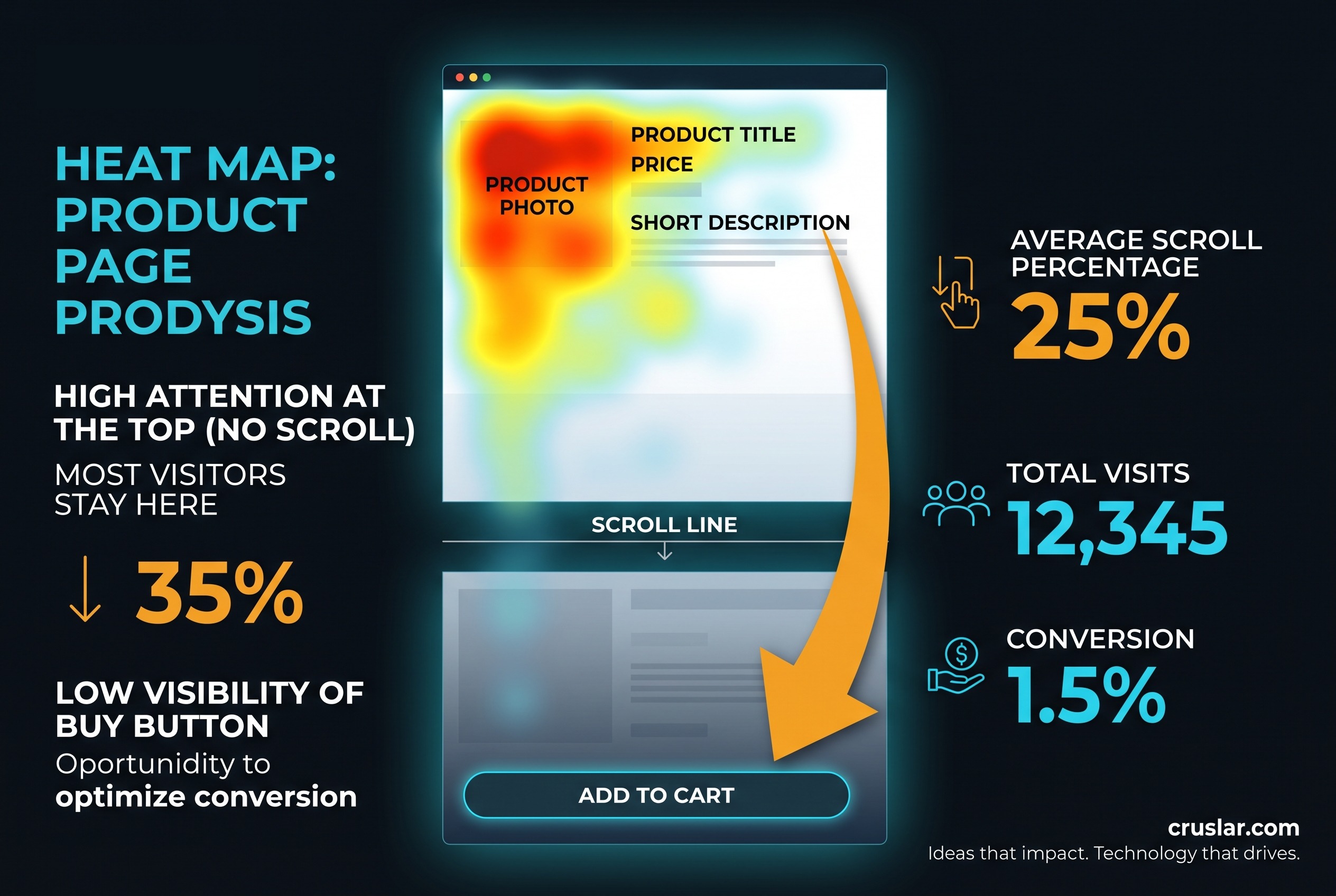
It's almost always a combination of two or three of these, not just one. Go through all of them before assuming which is yours.
The traffic isn't the right kind
Not all traffic is equal. If you're attracting visits through keywords that don't match what you sell, poorly targeted ads, or social content that sparks curiosity but not purchase intent, your visit count climbs while conversion drops, because the people arriving were never going to buy. Before touching the site, check where that traffic comes from and whether it actually matches what you offer.
Page speed is losing people before they even decide
A study by Google and Deloitte covering 30 million mobile sessions across several sectors found that cutting load time by just a tenth of a second increased conversions by 8% in retail and 10% in travel. If your site takes several seconds to show its content, a good share of visits leave before they even see what you're selling, and that doesn't show up as "abandonment": it shows up as a visit you never counted as interested in the first place.
The value proposition isn't clear in the first few seconds
Whoever lands on your site decides in seconds whether to keep looking or leave. If it isn't immediately clear what you sell, who it's for, and why buy from you instead of someone else, they leave before even getting to the price. It's the most common failure on sites designed on the assumption that "it's self-explanatory", when a first-time visitor has none of that context.
The checkout or contact process has friction
According to Baymard Institute data, close to half of people who abandon a checkout do so because of unexpected costs revealed at the last moment: shipping, taxes or fees that weren't shown earlier. Other common causes are being forced to create an account to buy, forms asking for more information than needed, or a checkout with too many steps. If your site is service-based rather than a store, the equivalent is a contact form that's too long or unclear about what happens after you submit it.
Trust signals are missing
Before paying or leaving their details, someone who doesn't know you looks for signs you're legitimate: real reviews, a recognisable and secure payment method, a visible address or phone number, a clear returns policy. Their absence doesn't show up as a technical error, but it slows the final decision just as much as any bug on the site would.
The website doesn't work well on mobile
Most traffic today arrives from mobile, and it tends to convert worse than desktop: less screen space, more distractions, and any friction is felt twice as hard. A buy button hidden below the fold, a form that forces zooming, or a menu that doesn't open properly on small screens is enough to lose someone who would have completed the purchase on desktop.
| What your metrics show | Likely cause | Where to check |
|---|---|---|
| High bounce, very short sessions | Speed or value proposition | PageSpeed Insights |
| Reach product, not cart | Price, info or trust | Heatmap |
| Cart filled, never checkout | Checkout friction | GA4 funnel |
| Mobile converts worse than desktop | Broken mobile experience | GA4 by device |
What happens if you don't fix it (the real cost)
The ad budget keeps getting spent, the time invested in SEO keeps not turning into sales, and every month that passes is a concrete amount of revenue that never arrived, even though it never shows up as a loss in any report. It's a quiet problem, because visits keep climbing: from the outside, the site looks like it's doing fine.
Idea: more traffic never fixes a conversion problem. If 98% of visitors leave without buying, doubling your traffic only doubles how many people leave without buying.
How to check yourself where you're losing visitors
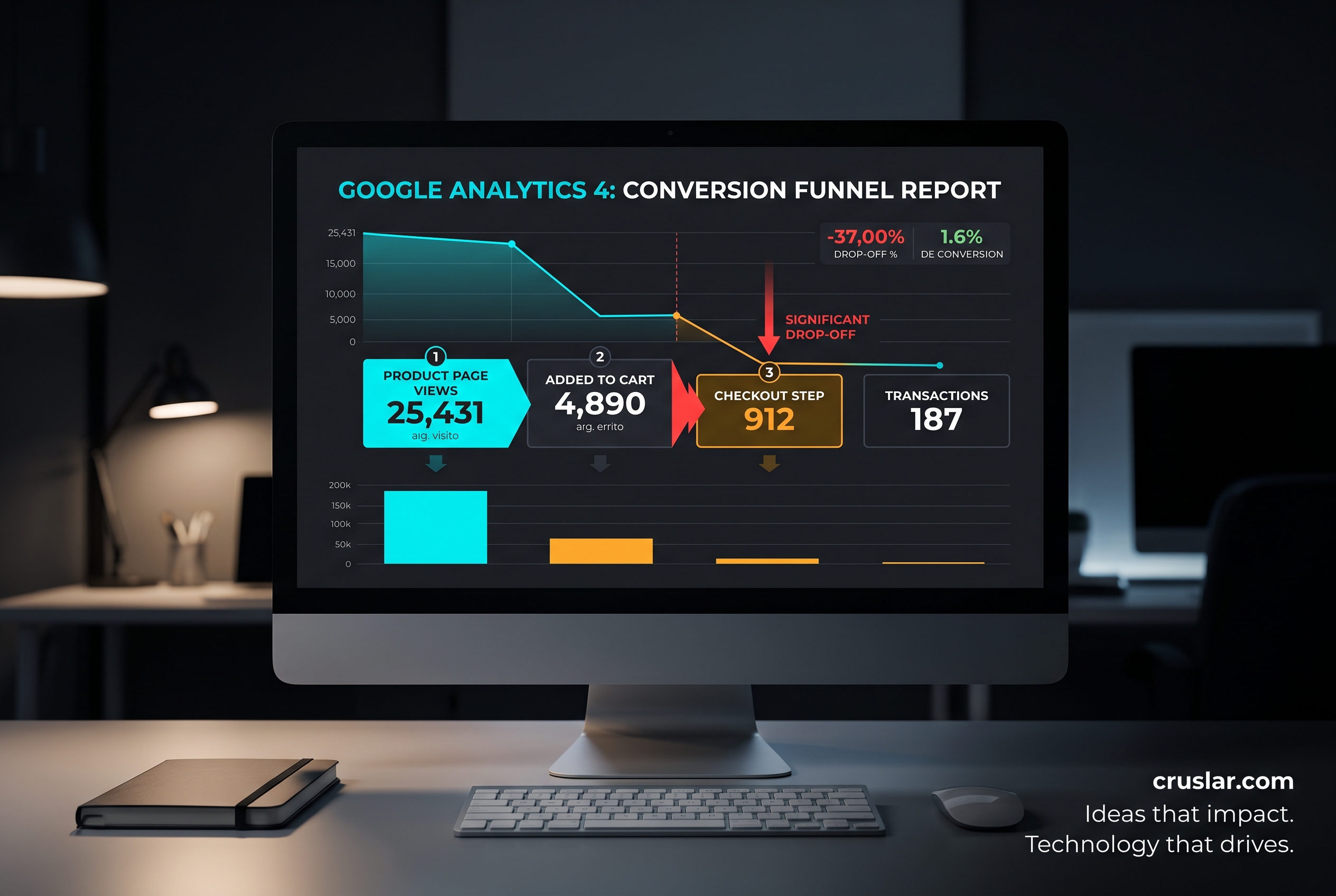
- Look at the conversion funnel in Google Analytics 4, from landing to purchase or form submission, and find the step with the biggest drop-off.
- Compare mobile conversion against desktop in the same report. If mobile is far behind, that's likely a big part of the problem.
- Install a heatmap or session recording tool (options like Microsoft Clarity are free) and see where people stop scrolling or which buttons they ignore.
- Check your speed with PageSpeed Insights, especially on mobile, which usually scores worse than desktop.
- Go through the whole process yourself, as if you were a first-time customer, from the ad or search result all the way to the last step of checkout or the form.
What to do for each cause (the fix)
- If the traffic isn't the right kind: review your ad targeting and which keywords you're attracting; there's no point optimising the site for visits that were never going to buy.
- If speed is the problem: optimise images, review your hosting and remove scripts that aren't pulling their weight; it's usually the fix with the fastest return.
- If the value proposition isn't clear: rewrite the headline and first section so they answer what it is, who it's for and why you, without needing to scroll.
- If there's friction in checkout or the form: show total costs as early as possible, allow guest checkout, and ask only for the information you actually need.
- If trust signals are missing: add real reviews, visible contact details and a clear returns policy or a clear explanation of next steps.
- If the problem is mobile: test the whole journey yourself on a real phone, not just the browser's device simulator.
What your website needs depending on your business stage
The same criterion we always apply at Cruslar shows up here too: the fix isn't the same for everyone.
- If you're just starting out or still validating the business: free tools (GA4, Microsoft Clarity, PageSpeed Insights) plus an honest walkthrough of your own purchase flow will usually find and fix most obvious friction points without spending on tools or audits yet.
- If you're already generating revenue and running steady paid traffic: the same percentage-point improvement is worth a lot more money, so it's worth investing in a full conversion audit, A/B testing and, if the underlying site is old or inflexible, considering a redesign instead of patching it piece by piece.
How to measure whether the fix worked
The main metric is conversion rate (sales or form submissions over visits) before and after the change, tracked over several weeks so a one-off spike doesn't skew it. It's also worth checking it by funnel step: if the problem was checkout, what should climb is the "cart to purchase" step specifically, not just the overall total. And if you touched speed, PageSpeed Insights gives you a clean before-and-after number.
Frequently asked questions
What's a good conversion rate for a website?
It varies a lot by industry and by whether you sell online or generate leads: for e-commerce, various studies place the global average somewhere between 2% and 3%, with big differences by sector and by device. Rather than comparing yourself to the average, it's more useful to compare your own rate against previous months.
Do I need more traffic, or should I fix conversion first?
Almost always, fix conversion first. If you're converting poorly, more traffic just multiplies how many people leave without buying. Fix the leak before opening the tap further.
How long does it take to see an improvement after making changes?
With moderate traffic, a few weeks is usually enough to see a clear trend. With low traffic, you need more time (or more volume) for the data to be reliable, so you don't mistake a real improvement for normal variation.
Is a heatmap worth it if I already have Google Analytics?
Yes, they're complementary. GA4 tells you at which step people drop off; a heatmap or session recording shows you why, by letting you see real behaviour on that specific page.
Does this also apply if my site doesn't sell directly, but generates leads instead?
Yes, the mechanism is the same: swap "purchase" for "form submitted" or "call booked", and the same causes (speed, value proposition, friction, trust) apply just the same.
Want to know why your specific website isn't converting?
We can review your case and tell you, with data, exactly where you're losing visitors, not a generic list of possible causes. Check out our web development service, read why your website isn't showing up on Google if the issue turns out to be traffic rather than conversion, or if the diagnosis points to something bigger, see when to redesign your website. Prefer to talk it through? Tell us about your case.
